Less guessing.
See the actual output.
Five sample documents, each with an input, a reviewable result, and a practical next step. Read the example online or open its two-page PDF.
11 pages · Fictional samples · Local rules and templates · No account needed
 2-page PDF · 127 KB
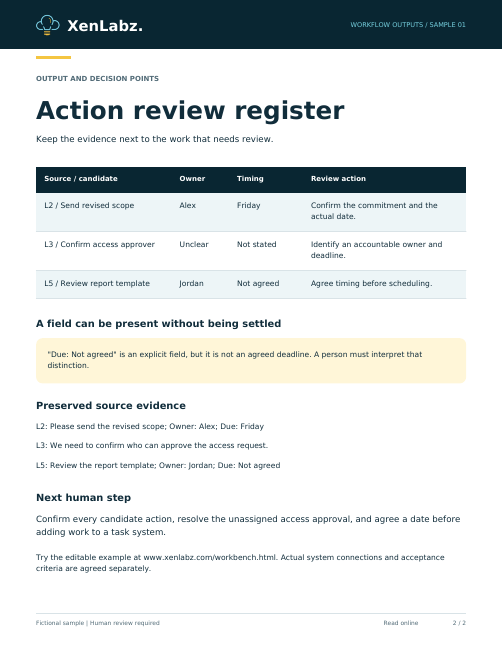
Notes to action review
Make owners, timing, and missing details visible.
Keyword-based candidate selection with exact source-line references. Only explicit Owner: and Due: fields are extracted.
Read the input and result online
Fictional input
Kickoff notes - fictional example
Please send the revised scope; Owner: Alex; Due: Friday
We need to confirm who can approve the access request.
Sam mentioned next week, but no commitment was agreed.
Review the report template; Owner: Jordan; Due: Not agreed
Rule-based output
CANDIDATE ACTIONS — keyword check, not AI extraction

[Line 2] Please send the revised scope; Owner: Alex; Due: Friday
Owner: Alex
Deadline: Friday
Confirm the commitment with the source author.

[Line 3] We need to confirm who can approve the access request.
Owner: Owner unclear
Deadline: Deadline not stated
Confirm the commitment with the source author.

[Line 5] Review the report template; Owner: Jordan; Due: Not agreed
Owner: Jordan
Deadline: Not agreed
Confirm the commitment with the source author.

Only explicit “Owner:” and “Due:” labels are extracted. Other names/dates remain in the quoted source for a person to interpret. Candidate lines may include negated, quoted, or completed actions; this checker does not understand intent.
 2-page PDF · 127 KB
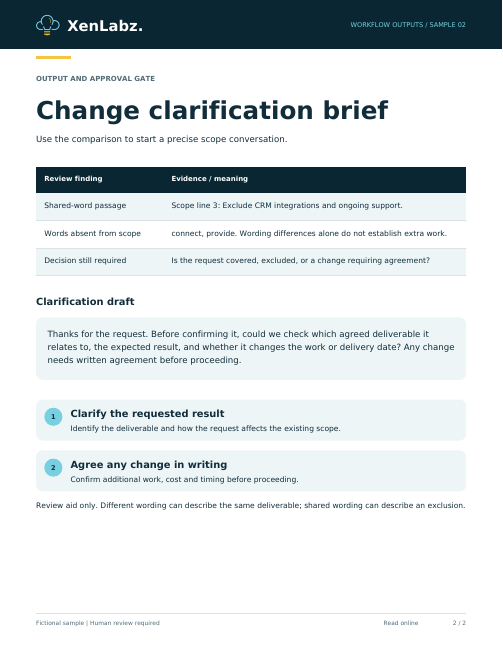
Scope change review
Check the wording before accepting more work.
Vocabulary comparison with source passages. This does not understand contractual coverage or determine whether a request is scope creep.
Read the input and result online
Fictional input
AGREED SCOPE
Configure one weekly report from an approved spreadsheet.
Include one template, test examples, and a handover guide.
Exclude CRM integrations and ongoing support.

NEW REQUEST
Could you also connect the CRM and provide ongoing support?
Rule-based output
SCOPE COMPARISON — vocabulary check only

REQUEST LINE 1: Could you also connect the CRM and provide ongoing support?
Words absent from the scope: connect, provide
Shared-word scope passages:
[Scope line 3] Exclude CRM integrations and ongoing support.
Review question: Is this covered by an agreed deliverable, an exception, or a change?

Different wording may describe the same deliverable. Shared words may describe an exclusion. This tool cannot decide contractual coverage or identify actual scope creep.

CLARIFICATION DRAFT
Thanks for the request. Before confirming it, could we check which agreed deliverable it relates to, the expected result, and whether it changes the work or delivery date? Any change needs written agreement before proceeding.
 2-page PDF · 127 KB
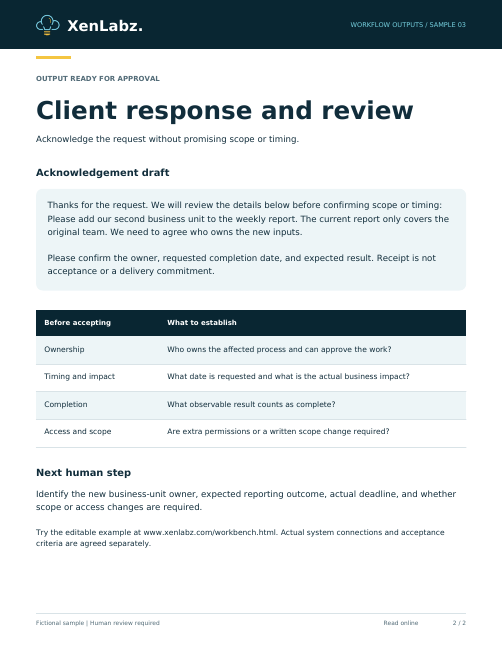
Client request brief
A consistent starting point for review and response.
Routing follows the impact selected by the visitor. The original text is preserved; the acknowledgement and questions use fixed templates.
Read the input and result online
Fictional input
REPORTED IMPACT: Planned improvement

Please add our second business unit to the weekly report. The current report only covers the original team. We need to agree who owns the new inputs.
Rule-based output
REQUEST REVIEW
Suggested route: Delivery owner / planned review
Basis: the impact you selected, not interpretation of the text.

SOURCE REQUEST
[Line 1] Please add our second business unit to the weekly report. The current report only covers the original team. We need to agree who owns the new inputs.

QUESTIONS BEFORE ACCEPTANCE
• Who owns the affected process and approves this work?
• What is the requested deadline and actual business impact?
• What result would count as complete?
• Is access or a scope change required?

ACKNOWLEDGEMENT DRAFT
Thanks for the request. We will review the details below before confirming scope or timing:
Please add our second business unit to the weekly report. The current report only covers the original team. We need to agree who owns the new inputs.

Please confirm the owner, requested completion date, and expected result. Receipt is not acceptance or a delivery commitment.

No ticket was created and no acknowledgement was sent.
 2-page PDF · 128 KB
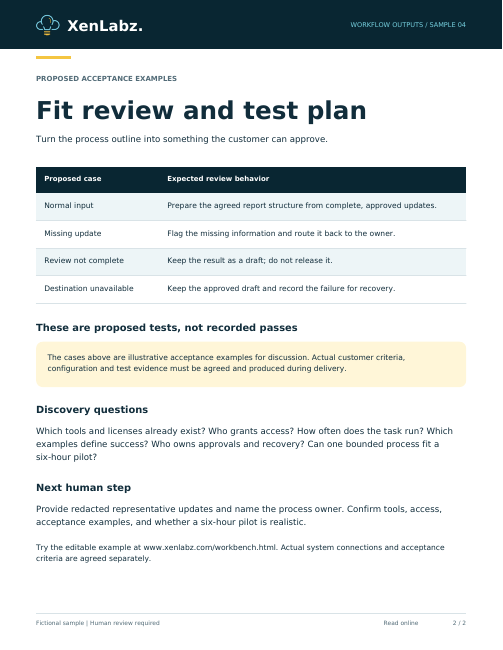
Workflow opportunity brief
See the inputs, approval gate, and proposed sequence.
A process outline based on explicit form selections. It does not assess tool compatibility, implementation effort, or economic return.
Read the input and result online
Fictional input
PROCESS
Every Friday we collect project updates by email and manually assemble a client report.

INPUT SOURCE: Email
DESIRED OUTPUT: Report
HUMAN REVIEW: Required
SCOPE: One bounded process
Rule-based output
WORKFLOW OPPORTUNITY BRIEF

Process: Every Friday we collect project updates by email and manually assemble a client report.
Candidate for a fit review — not a confirmed pilot.

PROPOSED SEQUENCE
1. Collect approved inputs from email.
2. Check required fields and return incomplete items to the process owner.
3. Prepare a report using agreed rules or templates.
4. A named person reviews the output before release.
5. Move approved results to the agreed destination and record failures.

IMPLEMENTATION QUESTIONS
• Which tools, licenses and access already exist?
• What triggers the process and how often does it run?
• What are the acceptance examples and failure cases?
• Who owns approvals, exceptions and recovery?
• Can the work fit within one six-hour pilot?

A $600 pilot is offered only after fit review and written agreement. Software costs are separate. This rules-based brief is a starting point, not an implementation feasibility assessment.
 2-page PDF · 128 KB
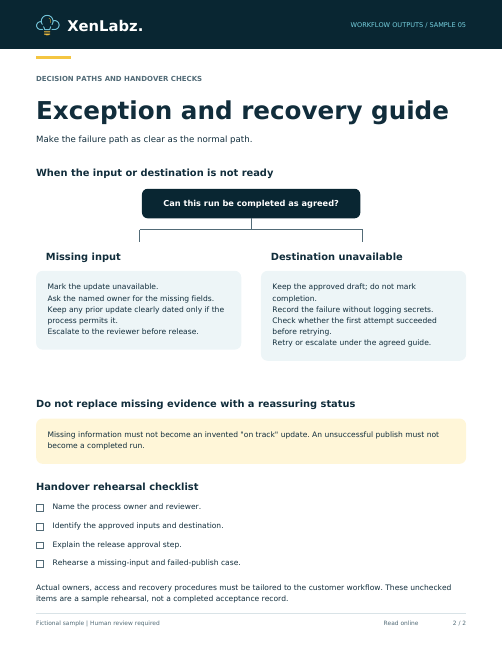
Operating guide
Show the team how to run the process and recover.
A fictional operating-guide preview with normal and exception paths. It does not operate a customer system or certify a completed handover.
Read the input and result online
Fictional input
FICTIONAL WORKFLOW
Weekly project reporting

INPUTS
Approved project updates with project, owner, status, date, update, and blocker fields.

RESPONSIBILITIES
The process owner collects inputs. A named reviewer approves release. Actual customer owners and destinations must be agreed before implementation.

WALKTHROUGH CHECKS
- Identify the process owner.
- Identify approved inputs.
- Explain review before release.
- Explain the recovery path.
Rule-based output
SAMPLE OPERATING GUIDE - weekly reporting

NORMAL WEEKLY RUN
1. Process owner collects approved project updates by the agreed cutoff.
2. Check project, owner, date, status, update and blocker fields.
3. Prepare the report and inspect every warning.
4. A named reviewer checks accuracy and authorizes release.
5. Publish through the agreed destination and record completion.

MISSING INPUT
1. Mark the missing project update as unavailable.
2. Ask the named owner for the missing fields.
3. Keep the previous update clearly labelled with its original date if the agreed process permits it.
4. Never turn missing information into an on-track status.
5. Escalate the missing input to the reviewer before release.

DESTINATION UNAVAILABLE
1. Keep the approved draft; do not mark the run complete.
2. Record the error and time without copying secrets into the log.
3. Check destination access and service status through the approved channel.
4. Before retrying, check whether the first attempt actually succeeded to avoid duplicates.
5. Retry or escalate according to the operating guide.
What would your version look like?
The fit review establishes the actual inputs, tools, review steps, and success criteria. A $600 pilot proceeds only after scope agreement; extra software costs are separate.
Request a no-cost fit review ↗These examples show local processing and proposed document structure. They are not customer case studies, contractual determinations, live integrations, or measured savings claims.